Atlas Edge · machine monitoring for factories:Your factory, alive.
Condition monitoring and maintenance for every machine on your shop floor. Atlas Edge learns what normal looks like for each one, flags the drift in plain words, and runs the repair by the book: approved, locked out and on the record.
3 units need attention
3 warning · 12 running · 2 idle
High-risk alarms
Review alarms ›All monitored points on CNC Machine 1 are within limits.
Operation information
MCT-101-A · Digital twin
Running- Spindle load62.4 % / 100 %
- Front bearing48.2 °C / 80 °C
Power & Load
9.4 kW
Active power
Equipment Information
96.4%
Machine health
- Serial
- MCT-101-A
- Gateway
- EDGE-GW-01
- Data pipeline
- Receiving
Temperature
72.4 °C
Peak · winding
Drive & Power Quality
1,480 rpm
Spindle speed
1.21 mm/s
Vibration Zone A · Normal
0.91
Power factor
61 N·m
Spindle torque
The film · 1:00 · sound on
See it in sixty seconds.
Every breakdown starts small: a little heat, a little shake. Watch it get caught there, and a Tuesday stoppage turn into a Monday-morning fix.

Reads the controllers already on your floor
Your machines are always talking.
A spindle bearing runs a few degrees warmer each week. A coolant pump draws a little more current. Every machine announces trouble long before it stops, but nobody on the floor has time to listen to all of them at once.
Most of it goes unheard. Until something stops.
Then it is an unplanned stop, a rushed repair with no isolation record, and a downtime figure someone guesses at the end of the month.
How it works
From a spindle to a signed-off repair.
- 01
Connect
A small edge box in each shop area reads the controllers and meters you already have. If the network drops, it keeps every reading in its built-in storage and sends it later, exactly once.
- 02
Understand
Every reading is checked for quality, stored without loss and rolled up by the minute and the hour. Each machine's normal is learned from its own history.
- 03
Act
When something drifts, the right people hear about it. The repair runs through verification, approval and lockout, and every step lands on the record.
The hardware
Meet E1. And E1 Reflex.
- E1Reads every machine in a shop area and sends it to the dashboard. It watches; your team acts.
- E1 ReflexEverything E1 does, and when a limit you set is crossed, it asks the machine to stop.
The platform
One place for every machine, every warning and every fix.
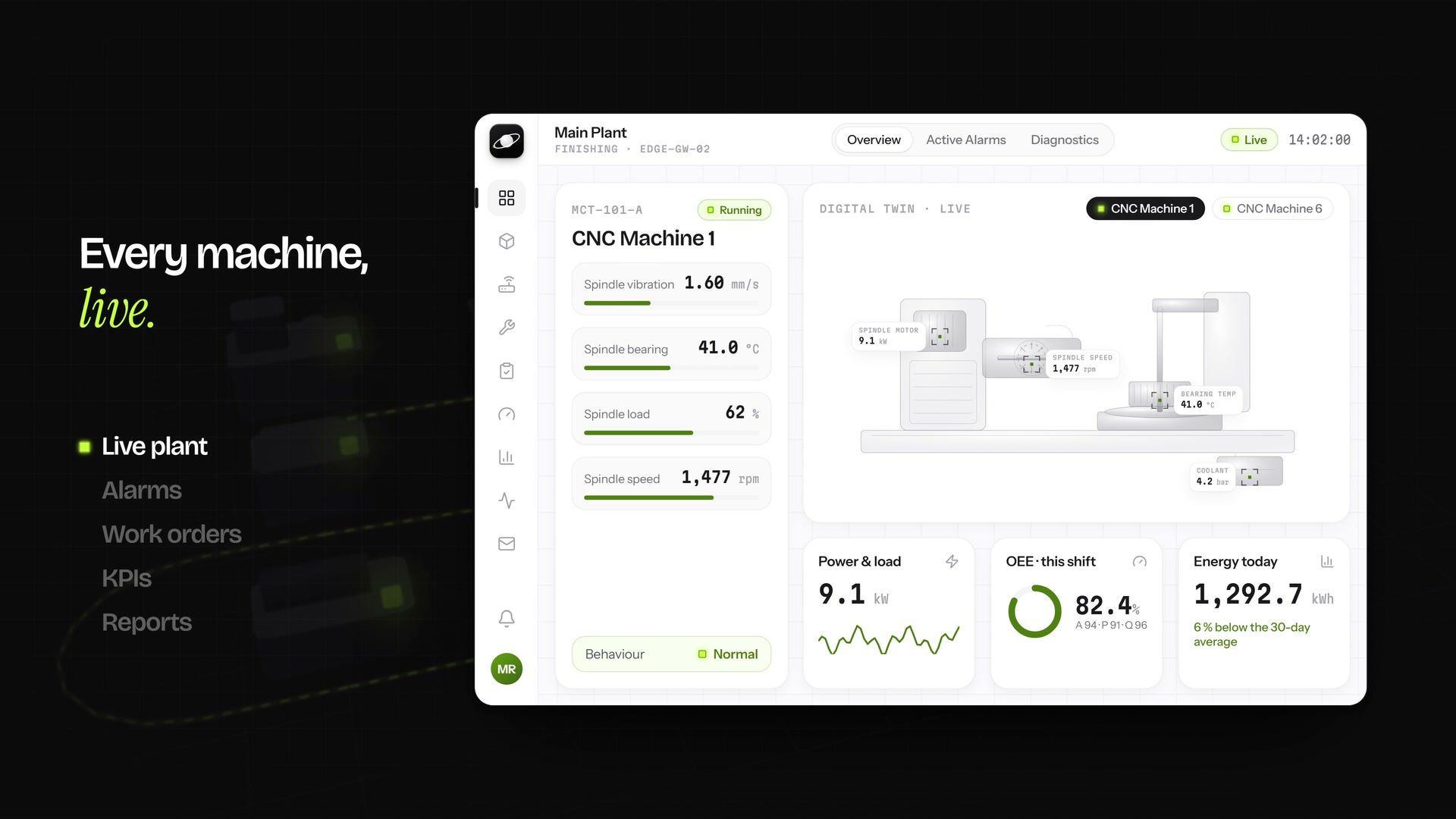
The dashboard · 1:14 · sound on
See it. Act on it. Prove it.
One overheating bearing, from the first warning to a signed-off fix, then the numbers that show the plant getting better.
17
signal types
From spindle vibration to part and reject counts
5
machine classes
Machine tools, gearboxes, pumps, motors, compressors
6
industrial protocols
Modbus, MTConnect, OPC UA, EtherNet/IP, MQTT and HTTP/JSON at the edge
2.5–5
bytes per reading
Raw history stored losslessly, then rolled up for good
1×
every batch, exactly once
Held on the gateway’s disk through an outage, replayed and de-duplicated
276
automated tests
Pinning every KPI formula, alarm rule and permission
Piloting now
Built on a real shop floor.
Atlas Edge is being piloted on a working shop floor: seventeen machines across four shop areas, from CNC machine tools to the compressors that feed them. Every feature on this page was shaped by what that floor needed, and the plant in every view is modelled on it.
A machine shop has a little of everything: machine tools, test rigs, pumps, motors and compressors. That is why it is where we start, not where we stop.
- 01 EDGE-GW-01
Machining
4 CNC machine tools
- 02 EDGE-GW-02
Finishing
2 CNC machine tools, 2 coolant pumps
- 03 EDGE-GW-03
Assembly & Test
3 test rigs, 2 drive motors, a pump test bench
- 04 EDGE-GW-04
Utilities
2 screw compressors, an EOT crane hoist
Where we are going
One platform. Every floor.
A pump wears the same way in a machine shop, a dairy and a water plant. So does a motor, a fan and a compressor. We start where we were built and go everywhere machines turn.
NowPiloting on a working shop floor
Auto components & gearsA spindle bearing running a degree warmer each week, flagged while it is a degree or two, not when it seizes mid-batch.CNC machine toolsSpindle vibrationGearbox test rigsOil temperatureCoolant pumpsMotor currentScrew compressorsDischarge temperatureNext5 industries · where we go next
Later6 industries · looking for design partners
- Plastics & packaging
- Food & beverage
- Water & wastewater
- Textiles & spinning
- Cement & mining
- Chemicals & process
If it turns, pumps, heats or compresses, Atlas Edge can learn it.Every industry, in detail
Questions
Asked before every pilot.
What is Atlas Edge?
Atlas Edge is a condition monitoring, maintenance and energy monitoring platform for factories. It connects the machines already on the shop floor, learns what normal looks like for each one, flags a machine that drifts from it, and runs the repair by the book: a work order, an approved lockout and a record of every step. It comes in two parts: a small box in each shop area (E1, the gateway) that reads the machines, and a dashboard in the browser where the team sees every machine, every warning and every repair.
Which machines and controllers does it work with?
It reads CNC controllers from FANUC, SINUMERIK, Mazak, Okuma and Haas over MTConnect; SINUMERIK, Siemens S7-1500 and FANUC over OPC UA; Rockwell ControlLogix, CompactLogix and Micro800 PLCs over EtherNet/IP; energy meters, drives (VFDs) and PLC registers over Modbus RTU and Modbus TCP; wireless sensors and IoT gateways over MQTT (plain JSON or Sparkplug B); and devices with an HTTP/JSON endpoint. Today it models machine tools, gearboxes, pumps, motors and compressors.
Do we have to replace our PLCs or controllers?
No. Atlas Edge reads from the controllers, meters and drives you already have, through one edge gateway per shop area, and never changes a program or setting. Only the E1 Reflex model can also ask a machine to stop, when a limit you set is crossed. Where a machine has no sensor for something that matters, a standard off-the-shelf meter or sensor can be added.
Do we need to fit sensors?
Only where a machine cannot tell us something that matters. Its controller gives its state, spindle load and part counts. A standard energy meter in its panel gives power and energy, and with them running, idle and off for machines with no controller. Sensors are needed for one job, the machine's condition: vibration and bearing temperature on pumps, motors, fans, gearboxes and spindles, and pressure and flow on pumps. Atlas Edge does not make sensors. It reads standard ones from their makers over Modbus, MQTT or OPC UA, so your electrician fits parts they already know.
How does it spot a machine going wrong?
For each machine and signal it learns how the reading normally moves with the load, from that machine's own running hours. When a bearing runs warmer than it should for the work it is doing, it flags it as Watch or Investigate with the reason in plain words, and says roughly when the reading will reach its warning limit, as a range of days, always labelled an estimate. Vibration is also judged from the first hours against the ISO 20816-3 zones and a reference someone has accepted, and against similar machines in the plant, so a machine that was faulty from the day it was installed is not learnt as normal. Until it has seen enough running hours it says it is still learning instead of guessing. It has been tested on a simulated plant and on real bearings run to failure on a test rig, where it flagged them days, not weeks, before their limit; figures from a working plant come with the pilot.
What happens when the network or the internet drops?
The gateway keeps reading and holds every batch in its built-in storage, then replays them when the link is back. Each batch is stored exactly once, so an outage neither loses nor doubles a reading. Missing data is shown as missing, never as zero.
Does it handle work orders and lockout/tagout (LOTO)?
Yes. Work orders move through verification and approval before work starts, a lockout must run under an approved order, field actions need a PIN, and releasing a lockout records the cause of the downtime. Every action lands in an activity log that reads as plain sentences.
What reports and KPIs does it give?
Availability, MTBF, MTTR, OEE, run hours, utilisation, energy and downtime by cause, per machine, area and plant. A monthly performance report with an Excel workbook arrives by email on the 1st, and every register (assets, work orders, LOTO, alarms) exports to Excel.
Which industries is it for?
Atlas Edge is being piloted on a working shop floor. The pumps, motors and compressors it already models run in almost every plant. Next are pharmaceuticals, warehousing and cold chain, power and renewables, steel and foundries, and buildings and data centres; plastics, food and beverage, water, textiles, cement and chemicals come later.
Can we get our data out?
Yes. A read-only data API serves units, telemetry, KPIs, alarms and work orders as JSON or CSV with keys you issue and revoke, and every view exports to Excel.
How do we start?
Write to us from the contact page and tell us about your floor: the machines, their controllers and how many shop areas you have. It starts with a gateway per shop area reading the controllers you already have.
Bring your plant alive.
A gateway per shop area, the controllers you already have, and your first monthly report in the inbox on the 1st. Tell us about your floor.